

If you’ve built Salesforce integrations for a while, you’ve probably developed a fairly predictable mental model.
A requirement comes in.
You identify the Salesforce data or operation involved. Then you pick an API, work out authentication, construct the request, handle the response, and move on.
Maybe it’s REST. Maybe it’s Bulk API. Maybe it’s Composite API. Maybe you’ve wrapped some of that logic behind Apex.
The important thing is that you already know what you’re trying to call.
AI agents complicate that model.
Not necessarily because the underlying Salesforce APIs have changed. They haven’t.
The difference is the caller.
An application usually follows instructions defined by a developer. An AI agent starts with something much less precise:
“Find the customers I should follow up with today.”
That’s not an API request.
It’s a goal.
The agent has to figure out what information it needs, what capabilities are available, which operations are relevant, and how to put the results together.
This is where the Model Context Protocol (MCP) becomes interesting for Salesforce developers.
And no, MCP isn’t simply “the new API.”
That’s too simplistic.
First, Forget the AI Hype for a Minute
Let’s use something familiar.
Suppose you’re building a React application for a sales team.
The application needs to display Accounts from Salesforce.
Your architecture might look something like:
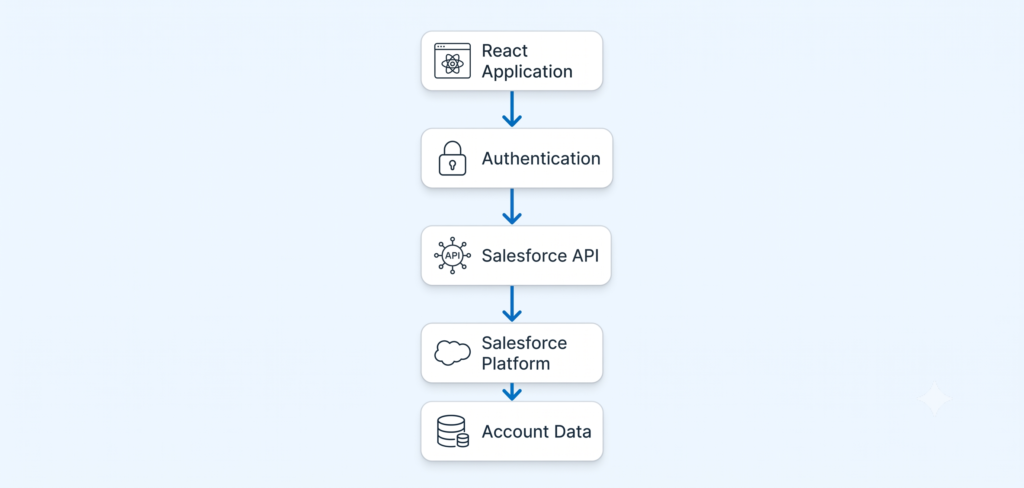
You know what the application needs.
You know which API to use.
You write the integration.
The application sends a request, Salesforce processes it, and you get a response.
There isn’t much decision-making involved at runtime.
Now change the requirement.
The sales manager types:
“Which accounts should I prioritize today?”
That’s a completely different problem.
There isn’t one obvious endpoint called:
/accounts-that-I-should-prioritize-today
You might need Account data, Opportunity data, recent Tasks, activity history, perhaps ownership information, and some business rules.
An agent can reason through that.
But reasoning alone isn’t enough.
It needs access to capabilities.
And that’s where MCP comes in.
So What Exactly Is MCP?
Model Context Protocol (MCP) is an open protocol that standardizes how AI applications interact with external capabilities.
The important word is standardize.
Without a common protocol, an AI client and every external system could end up needing their own custom integration pattern.
With MCP, an AI client can interact with MCP-compatible servers through a common protocol.
At a very high level:
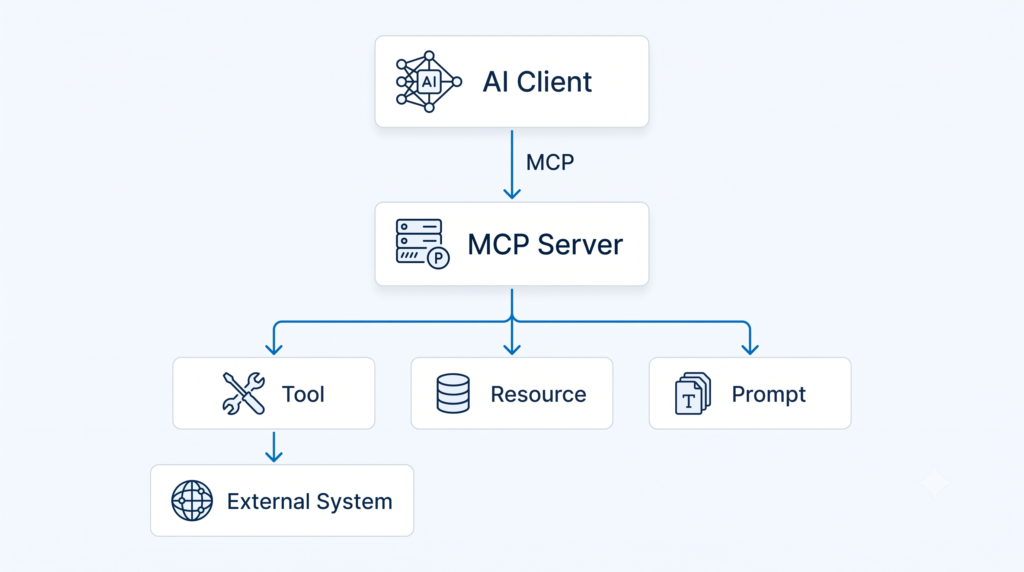
For Salesforce developers, however, I’d simplify the mental model even further:
MCP gives an AI client a standardized way to work with capabilities exposed by a system.
That’s the part that matters.
MCP doesn’t decide what your business logic should be.
It doesn’t replace your Salesforce security model.
And it doesn’t somehow turn every REST endpoint into an intelligent agent.
It’s an interaction layer.
MCP Is Not a Replacement for APIs
This distinction is worth spending some time on because it’s easy to get wrong.
Imagine you’re writing an integration that runs every night.
It needs to retrieve yesterday’s Opportunities and send them to a data warehouse.
You know exactly what needs to happen.
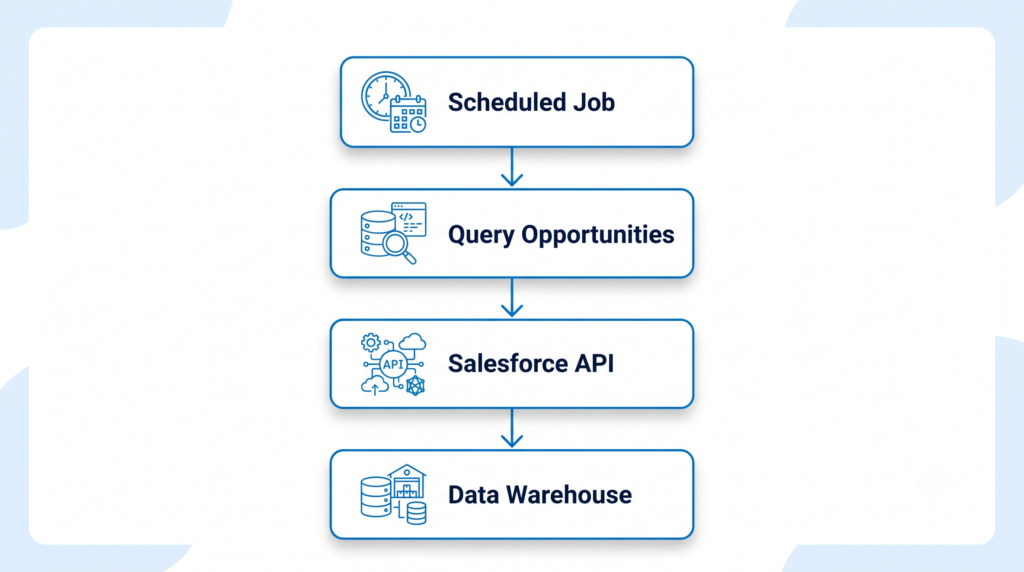
There’s no reason to introduce an AI agent just because you can.
In fact, doing so could make a deterministic integration worse.
Now consider this:
“Look at today’s pipeline and tell me which opportunities need attention. If there are obvious stale opportunities, suggest what the account executive should do next.”
Now the problem is less deterministic.
The system has to interpret the request and decide which information and capabilities it needs.
That’s where an agent becomes useful.
And MCP gives that agent a standardized mechanism for interacting with those capabilities.
So I’d think about it this way:
| Traditional integration | Agentic interaction |
|---|---|
| Developer defines the operation | Agent determines what it needs |
| Endpoint-oriented | Capability/tool-oriented |
| Request is known in advance | Intent may be expressed in natural language |
| Application controls the sequence | Agent can reason about the sequence |
| Usually deterministic | Potentially dynamic |
This doesn’t mean one is better than the other.
They solve different problems.
The Mental Model Changes From “Endpoint” to “Capability”
This is probably the biggest conceptual shift for a Salesforce developer.
With an API, you’re often thinking:
Which endpoint do I call?
With an agent, the question becomes:
What capability do I need?
That sounds like a small change in vocabulary.
It isn’t.
Consider:
“Create a user and give them the Sales permission set.”
A traditional integration might have a developer explicitly implement a sequence of API calls.
An agent needs to reason about the task:
Create User
      +
Assign Permission Set
The underlying Salesforce operations still exist.
But the AI-facing interface can present those operations as capabilities that an agent can discover and invoke.
This is one of the ideas behind Salesforce’s Headless 360 MCP Server.
Where Salesforce Headless 360 Fits
Salesforce’s Headless 360 MCP Server is currently a Beta service. It provides a single MCP server surface that an MCP-aware agent can use to access a growing set of Salesforce operations.
There’s an interesting architectural decision behind it.
Salesforce could have exposed thousands of individual MCP tools.
That sounds attractive at first.
It isn’t.
Imagine handing an AI agent a toolbox containing thousands of tools and asking:
“Pick the right one.”
The model now has to process a huge tool surface.
Salesforce instead designed the Headless 360 MCP Server around four tools:
DiscoverDescribeDispatchDispatch Read Only
Behind those tools is a growing library of Salesforce operations. This keeps the MCP-facing surface relatively small while allowing the underlying capability set to grow.
That’s a much more interesting architecture than simply saying:
“Salesforce now has MCP.”
Think About the Flow Like This
Suppose the user asks:
“Create a user for our new sales representative and assign the Sales permission set.”
A simplified conceptual flow is:
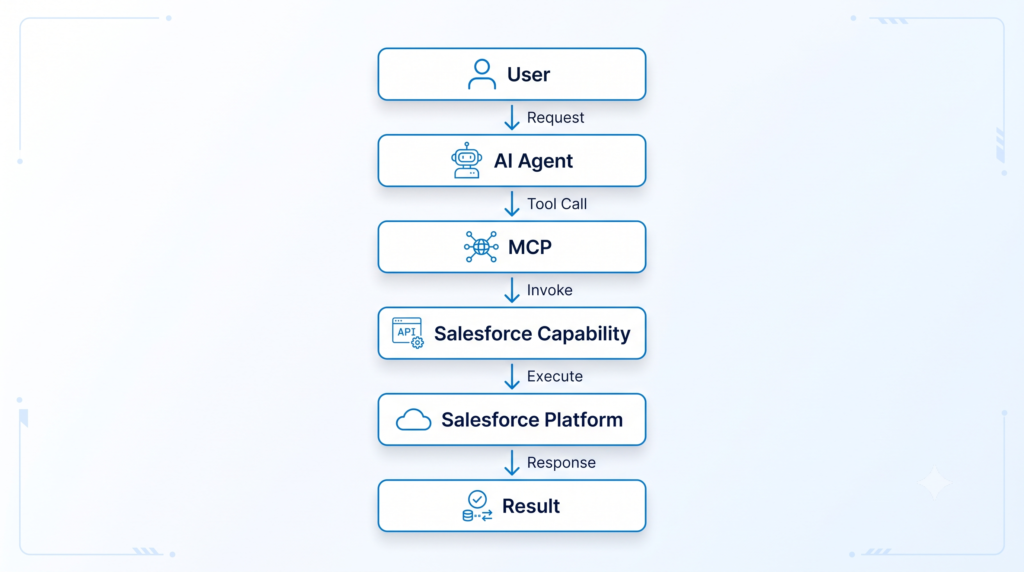
But there’s a lot hidden inside that simple diagram.
The agent first has to figure out what it needs to do.
Then it needs to identify the relevant capability.
Then it needs to understand how that capability works.
Only then can it execute it.
That’s where Discover and Describe become important.
Discover: “What Can I Do?”
The first question an agent may need to answer is:
What Salesforce capability can accomplish this task?
The Headless 360 MCP Server’s Discover tool performs a semantic search across its available operations and returns candidate operations relevant to the agent’s request.
So instead of giving the model thousands of tools to inspect, the server helps narrow the search.
Conceptually:
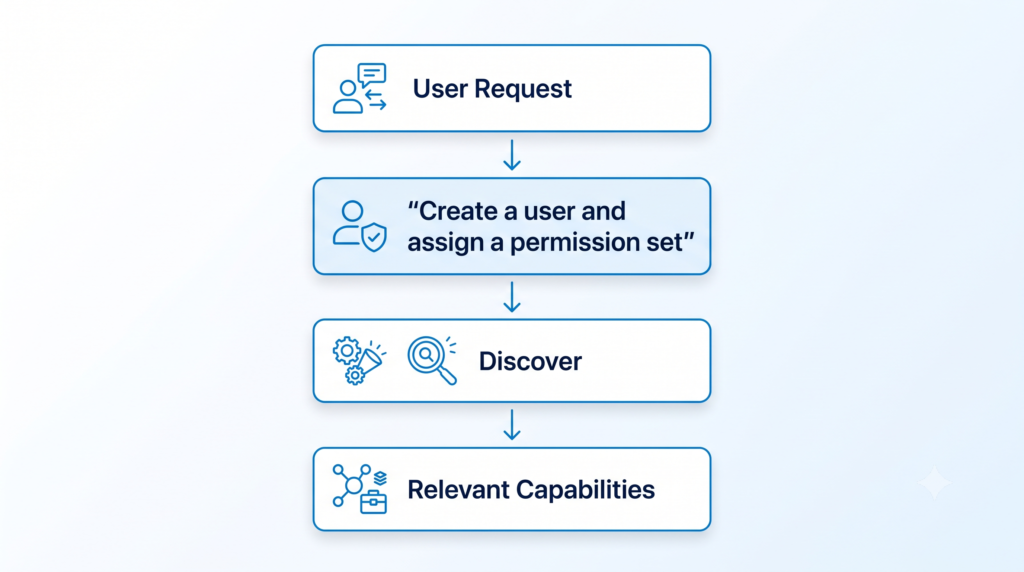
This is one of the places where MCP starts looking quite different from a conventional integration.
The agent doesn’t necessarily need to have every operation hard-coded into its application.
It can discover what is available.
Describe: “How Does It Work?”
Finding a candidate operation isn’t enough.
The agent now needs to understand the contract.
What parameters are required?
What APIs are involved?
Are there dependencies?
Are there multiple steps?
Salesforce’s Describe tool returns the technical specification for the selected operation, including APIs, parameters, dependencies, and ordered steps.
Conceptually:
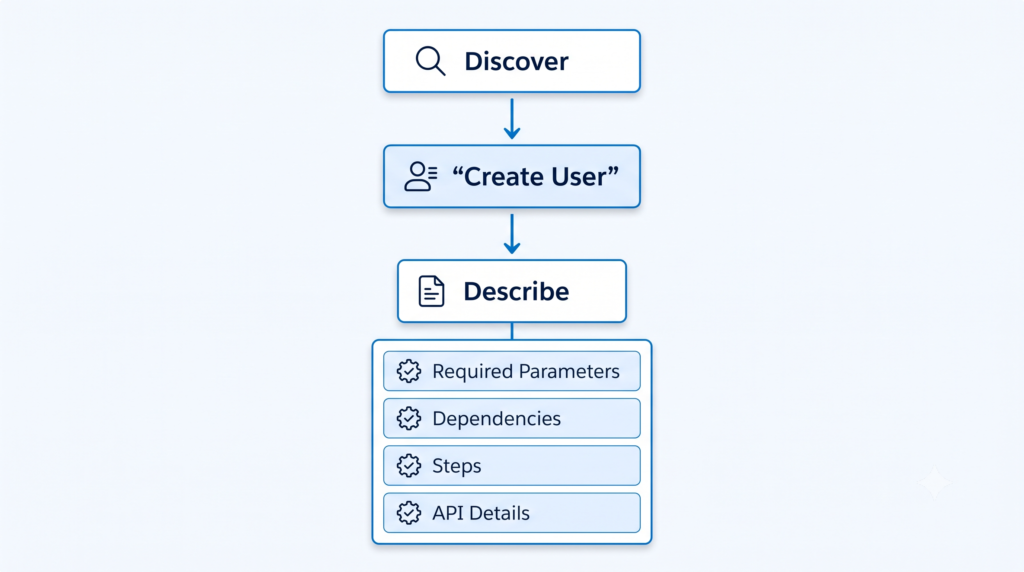
This is particularly useful when the operation isn’t just a single API call.
An apparently simple user request might actually require several underlying Salesforce operations.
The agent doesn’t have to guess at the sequence.
The capability description can provide the necessary information.
Dispatch: “Do It”
Now we reach the part that should make every Salesforce architect pay attention.
The agent has identified a capability.
It understands the contract.
Now it wants to execute it.
That’s where Dispatch comes in.
Salesforce describes Dispatch as the mechanism that invokes the selected operation, routes the request to the appropriate endpoint, and enforces the access guard before execution.
So the conceptual flow becomes:
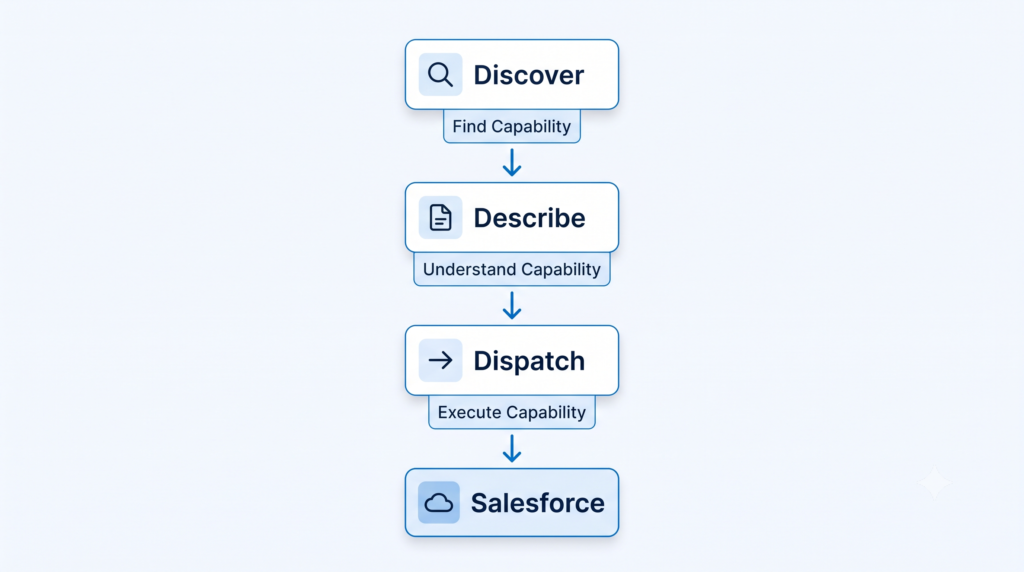
There is also a Dispatch Read-Only operation for read-only actions. Salesforce specifically documents this as an operation that doesn’t modify data or configuration.
That distinction matters.
A system that can read your Salesforce org is one thing.
Another system that can change it is.
A Practical Example
Let’s take something less administrative.
Suppose the user asks:
“What opportunities should I focus on today?”
An agent might need information from Opportunities, Accounts, Tasks, and perhaps recent activity.
The exact operations will depend on what capabilities are available to the agent.
Conceptually:
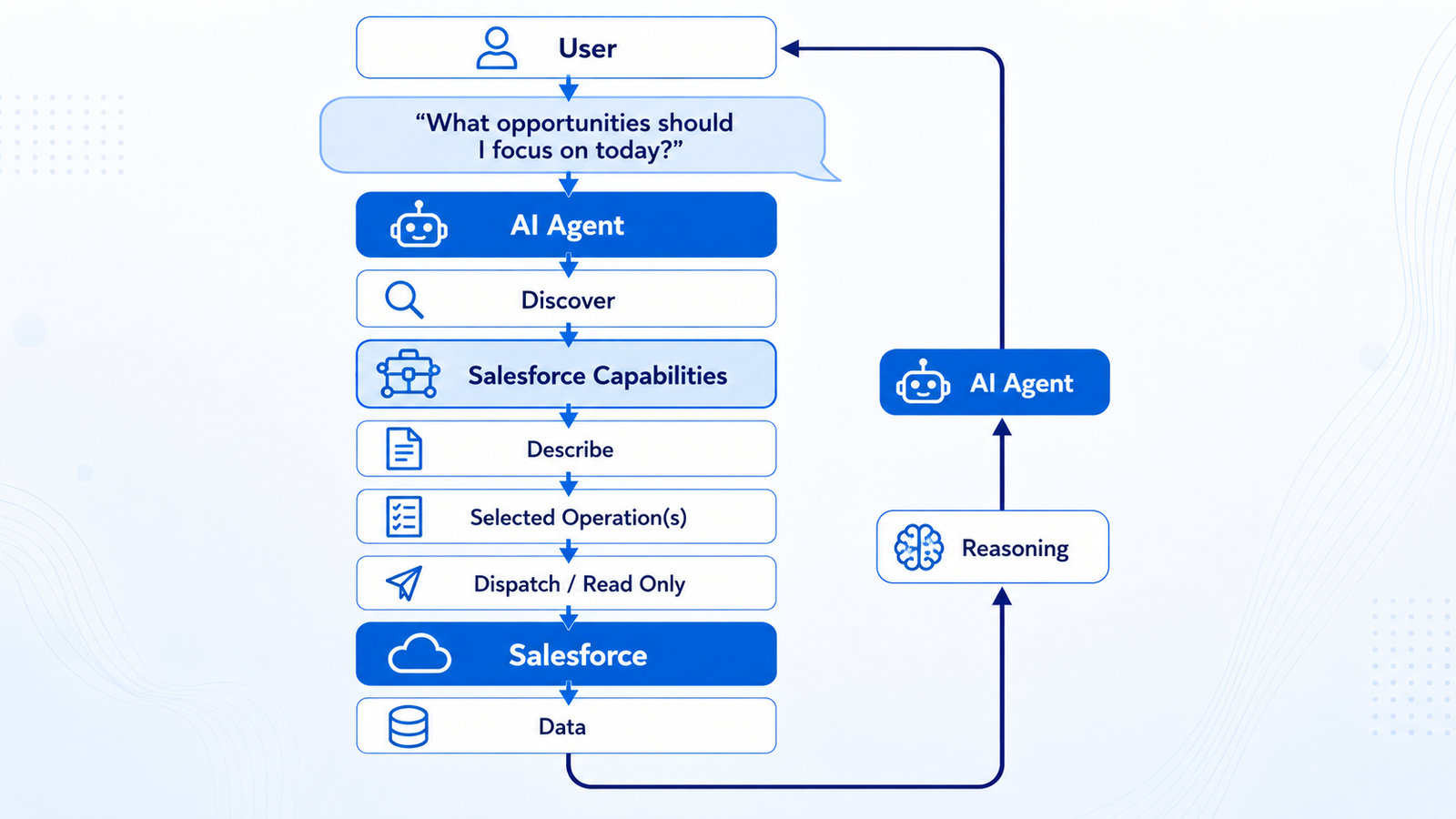
Notice something important here.
MCP isn’t doing the reasoning.
The AI agent is.
MCP provides the standardized mechanism through which the agent can interact with the available capabilities.
That distinction gets lost surprisingly often.
What Does the Agent Actually Know?
This is where the developer in me gets interested.
An AI agent doesn’t magically understand your Salesforce org just because you’ve connected an MCP server.
It needs structured information.
Tool names.
Descriptions.
Input schemas.
Constraints.
Results.
And, depending on the implementation, dependencies, and sequencing information.
That is why the quality of the capability definition matters.
Salesforce has specifically discussed this problem in the context of exposing custom Apex as Hosted MCP tools: agent-facing tools need to be designed with clear descriptions, useful structured outputs, and sensible boundaries.
This will become an important Salesforce development skill.
Not just:
“Can I write the Apex?”
But:
“Can an agent understand what this Apex capability does, when it should use it, what inputs it needs, and what result it will get back?”
That’s a different design problem.
MCP Doesn’t Remove Salesforce Security
This is another area where I wouldn’t oversimplify things.
An AI agent shouldn’t magically get administrator privileges because you’ve connected it to MCP.
Salesforce’s current Headless 360 MCP Server runs transactions as the authenticated user, using an External Client App configured with the mcp_api scope. Salesforce says CRUD, field-level security, sharing rules, profile permissions, and permission sets continue to apply.
In other words:
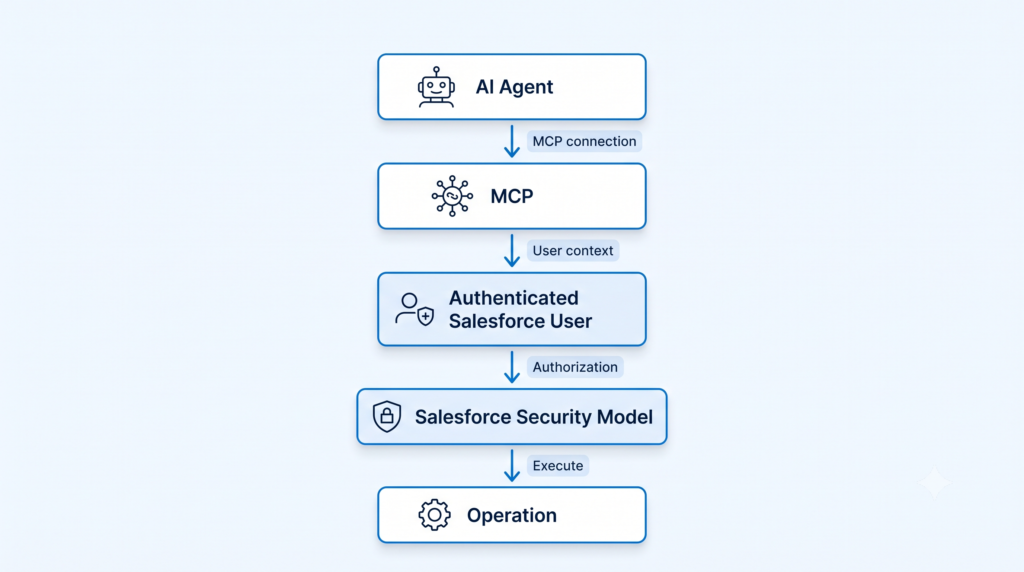
That is an important architectural property.
The agent doesn’t become a new privileged identity simply because it is an AI agent.
At least in this Salesforce-hosted model, the operation remains bounded by the authenticated user’s access.
And Salesforce recommends testing configuration changes in sandboxes and developer orgs before moving them into production.
For anything that can mutate data or configuration, I would treat that advice as more than a footnote.
So What Actually Changes for a Salesforce Developer?
This is where I think MCP gets more interesting than the protocol itself.
For years, Salesforce developers have been very good at building functionality for humans and applications.
Now we’re adding another consumer:
AI agents.
That changes some design considerations.
Tool boundaries matter
Should one tool perform five unrelated operations?
Probably not.
Should you expose twenty tiny tools that an agent has to call in a rigid sequence?
That can be problematic, too.
Salesforce’s guidance on custom Apex MCP tools emphasizes building self-contained, useful tools while avoiding both overly granular and overly broad interfaces.
Descriptions matter
An Apex method name might make perfect sense to the developer who wrote it.
An AI model doesn’t have that context.
A tool called: It
processCustomerData()
is not particularly helpful.
A capability with a precise description, clear inputs, useful output, and well-defined boundaries is much easier for an agent to use correctly.
Outputs matter
If your method returns a large collection of raw Salesforce fields, the agent now has to interpret them all.
Sometimes, the better design is to return the business result the agent actually needs.
That is an architectural decision.
And it’s one we’ll see much more of as Salesforce capabilities become agent-accessible.
MCP vs API: Don’t Pick a Winner
I wouldn’t frame the future as:
APIs are old. MCP is new.
That’s marketing, not architecture.
A better way to think about it is:
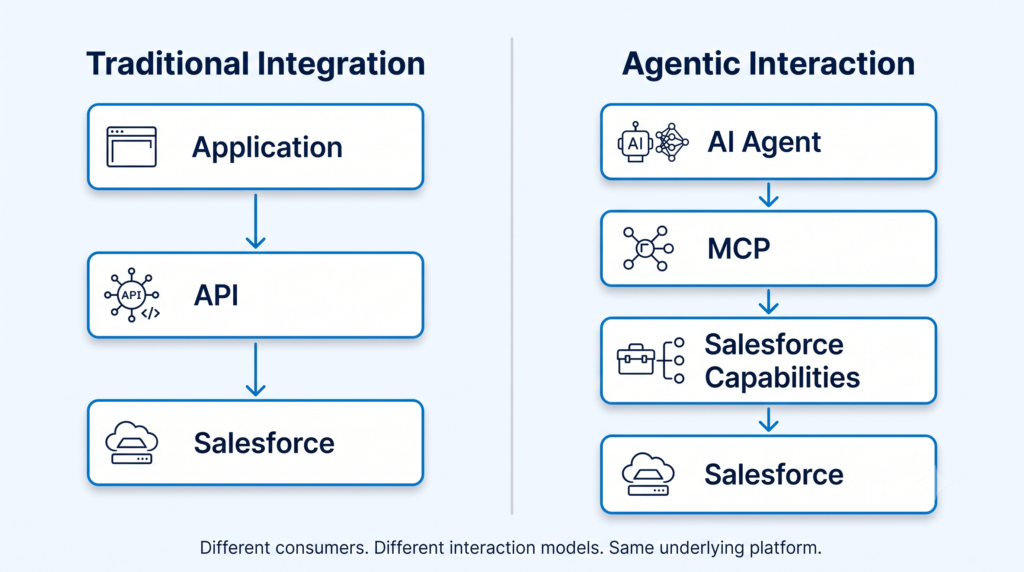
Different consumers.
Different interaction models.
Different problems.
And they can coexist.
In fact, they probably will.
A single Salesforce capability might be consumed by a traditional application via an API, by an AI agent via MCP, and by a developer via CLI tooling.
That’s much closer to the Headless 360 idea: Salesforce capabilities are no longer assumed to belong exclusively to one user interface. Salesforce describes Headless 360 as making major platform capabilities available to authenticated callers via APIs, MCP tools, and CLI commands.
The Bigger Architectural Question
MCP itself isn’t the most interesting part.
The more interesting question is:
What happens when Salesforce capabilities become first-class building blocks for AI agents?
Think about a custom Apex service you’ve built.
Today, perhaps it’s called from:
- a Flow
- an LWC
- another Apex class
- an integration
- a REST endpoint
Tomorrow, the same business capability might also become something an agent can discover and invoke.
That forces us to reconsider things we have traditionally treated as implementation details.
Descriptions.
Inputs.
Outputs.
Permissions.
Idempotency.
Guardrails.
Observability.
The code might still be Apex.
The architecture around that code is changing.
What Salesforce Developers Should Learn
If you’re already comfortable with Salesforce development, I wouldn’t recommend abandoning your existing skill set and starting over with “AI.”
That’s not the point.
I’d build on what you already know.
Keep strengthening:
- Apex
- SOQL
- APIs
- OAuth
- Platform Events
- Integration patterns
- Salesforce security
- Data modeling
Then add:
- MCP fundamentals
- AI agent architecture
- Tool design
- Agent permissions
- Guardrails
- Structured inputs and outputs
- Agent observability
- Idempotent operations
The combination is much more valuable than either side by itself.
A developer who understands MCP but not Salesforce security will struggle to build safe, agentic systems.
A Salesforce developer who understands Apex but doesn’t understand how agents consume tools may eventually find that their existing capabilities aren’t designed for this new consumer.
The sweet spot is somewhere in the middle.
One Last Mental Model
If you’re a Salesforce developer and want a simple way to remember all of this, use this:
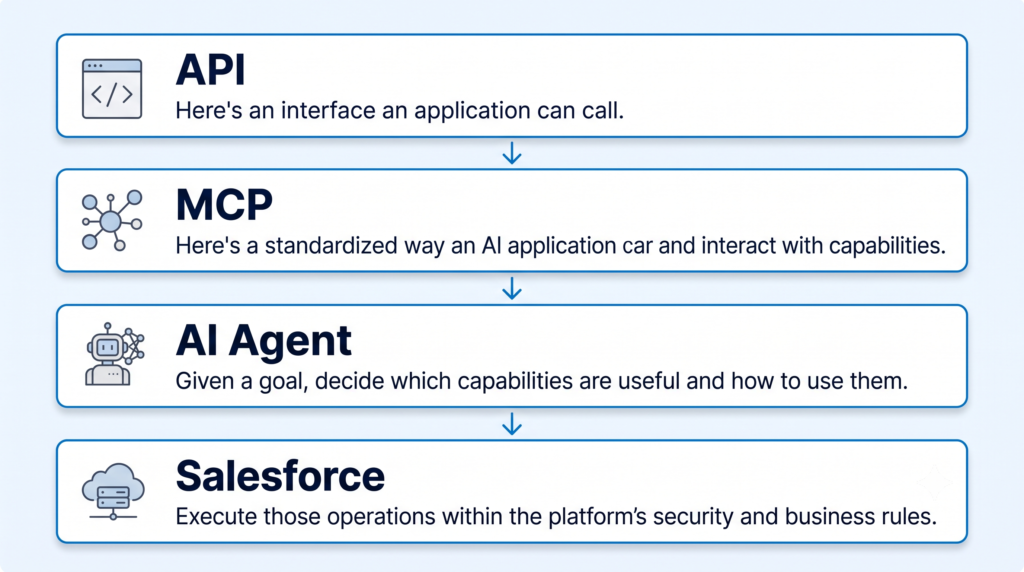
That’s the architectural shift.
Not API vs MCP.
Not Salesforce vs AI.
It’s about giving different consumers different ways to access the same underlying platform capabilities.
Key Takeaways
If you remember only five things from this article, remember these:
- MCP does not replace Salesforce APIs.
- MCP provides a standardized interaction model for AI applications and tools.
- AI agents introduce a more dynamic, capability-oriented interaction model.
- Salesforce Headless 360 brings this model closer to the Salesforce platform and its capabilities.
- For Salesforce developers, the interesting challenge isn’t just exposing functionality—it is exposing it safely, clearly, and in a way an AI agent can actually use.
And that last point is where I think the conversation gets much more interesting.
The future of Salesforce development isn’t simply about building another endpoint.
It’s about deciding what capabilities should be available, who—or what—should be allowed to invoke them, and how much autonomy we are comfortable giving the system on the other side of the interface.
Good article